Wysyłanie szyfrowanych wiadomości e-mail typu end-to-end w Gmailu: bezpieczna komunikacja z Google Workspace
Opublikowano: 2025-04-05
Ten artykuł nie jest jeszcze w pełni przetłumaczony na ten język — poniżej wersja angielska.
New in Gmail for Enterprise users
Easy use of end-to-end encrypted emails for every organization.
Google is committed to making secure, confidential communication not just a privilege of large enterprises, but available to every organization, regardless of size. However, end-to-end encrypted (E2EE) email sending was long only feasible for those with serious IT resources — mainly due to the technical complexity of S/MIME and other custom solutions. Over the past two years, Google has taken significant steps to break down these barriers. Their goal was to make E2EE easier to use, thereby supporting organizations' compliance and data sovereignty efforts. All of this now reaches a new level.
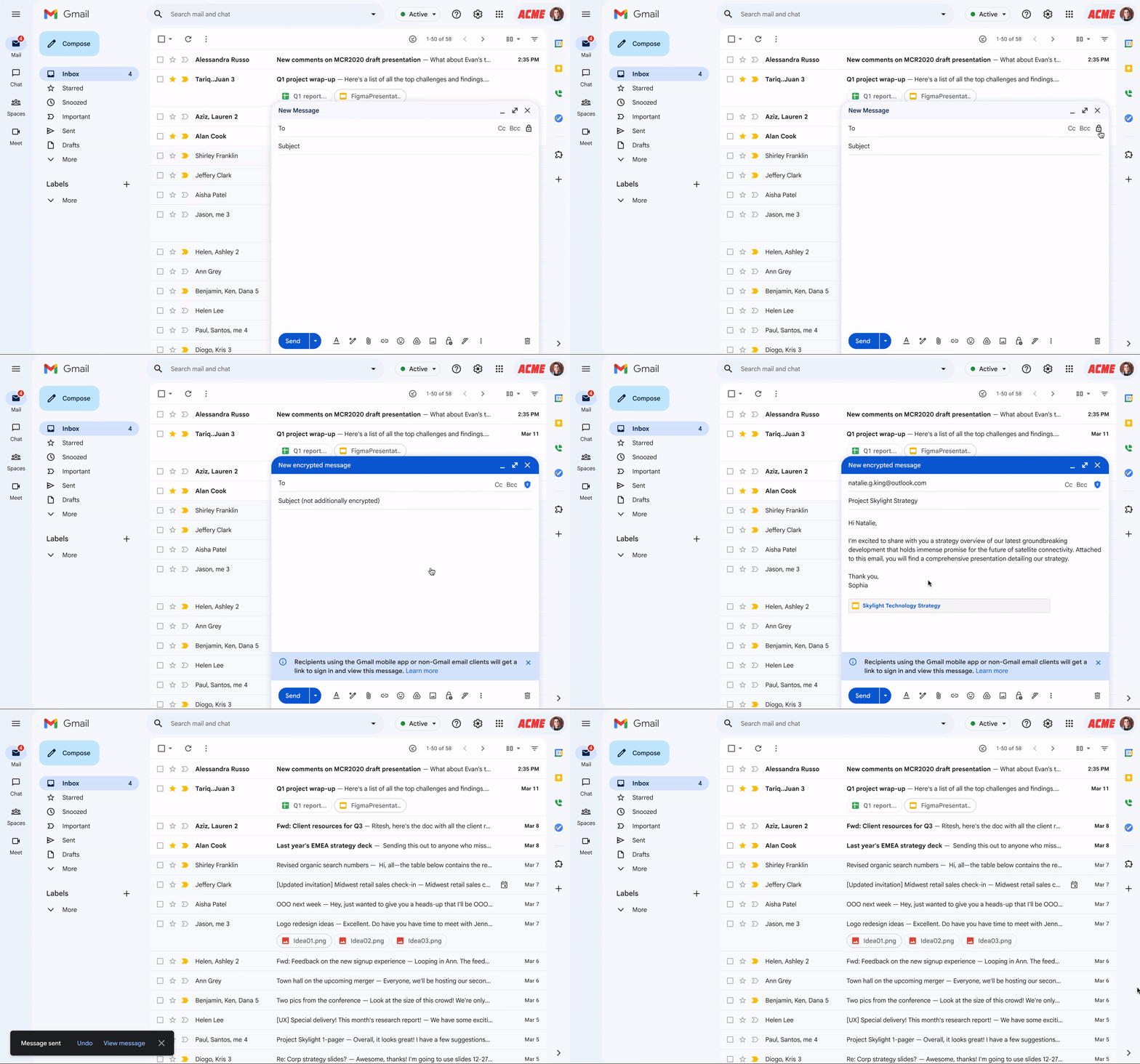
On April 1st, on the occasion of Gmail's birthday, Google came out with a truly special development: from now on, business users can send E2EE-encrypted emails to any email address with a few clicks — regardless of what mail system the recipient uses. This new capability requires minimal technical intervention from both IT teams and end users, and frees you from the complicated setups and poor user experience characteristic of previous solutions — while preserving the controls needed for high-level data protection, data sovereignty and security.
The rollout is gradual: the beta version is already available, allowing E2EE messages to be sent between Gmail users within the organization. In the coming weeks this will extend to every Gmail account, and in the second half of the year to any email mailbox.
At the enterprise level, encrypting data is almost a basic expectation today, whether for storage or data transfer. Gmail provides this automatically. However, when it comes to true end-to-end encryption (E2EE), most solutions are still too complex and resource-intensive for most organizations. One of the best-known methods, S/MIME, makes it possible to send digitally signed and encrypted emails. It is mainly used by heavily regulated sectors, such as government agencies or their suppliers. However, operating S/MIME is no small task: certificates must be obtained, managed and distributed to every user, which places a serious burden on IT teams.
It is not simple for users either: if the other party does not have the appropriate settings, there is no way to communicate encrypted. The manual exchange of certificates, the accompanying technical obstacles and the uncertainty often lead to no encrypted messaging taking place at all. Many organizations therefore look for alternatives, such as built-in encryption options or external, custom solutions. These, however, either carry data protection risks (e.g. shared encryption keys) or degrade the user experience through separate portals and applications.
As a Google partner company, we also believe: there must be a simpler, more effective and more accessible way to secure communication for everyone. Google's new development makes exactly this possible.
Sending End-to-End Encrypted Emails to Any Gmail Account
The idea is simple. Emails are encrypted with a few clicks in Gmail, regardless of who they are sent to — there is no need for end users to exchange certificates or use custom software. The emails are protected using encryption keys that are controlled by the customer and are not accessible to Google's servers, thus ensuring enhanced data protection and security. The IT team no longer has to deal with complicated S/MIME setup or certificate management. This is how it works in the background:
- If the recipient is a Gmail user (business or personal), Gmail sends an end-to-end encrypted email. The email is automatically decrypted in the recipient's inbox, and the recipient can use Gmail in the usual way.
- If the recipient is not a Gmail user, Gmail sends them an invitation to view the end-to-end encrypted email in a restricted version of Gmail. The recipient can then use a guest Google Workspace account to securely view and reply to the email.
- If the recipient has S/MIME configured, Gmail sends the email via S/MIME (just as before).
For IT teams, it is also possible to require that every external recipient (even if a Gmail user) use the restricted version of Gmail. This helps ensure that the organization's data does not have to be stored on third-party servers and devices. In addition, it makes it easier for organizations to protect their data, as it provides the ability to apply security rules and revoke access to emails, regardless of when they were sent. In essence, the end-to-end encrypted email is like a document in Google Drive, so the IT team can control access to it.
This new feature is based on client-side encryption (CSE), which is a technical tool in Workspace, and helps organizations protect their sensitive emails, documents, calendar events and meetings with encryption keys that are exclusively under their control and are stored outside Google's infrastructure, at a location of their choice. The data is encrypted on the client side before being transmitted or stored in Google's cloud storage, making it unreadable to Google and other third parties, and helping to meet regulatory requirements such as data sovereignty, HIPAA and export restrictions.
Further security and sovereignty improvements in Gmail
Beyond E2EE (End-to-End Encryption) emails, we have also made numerous security features available in Gmail to help organizations maintain the security and compliance of their data, including:
[CSE default mode](https://support.google.com/a/answer/10745596?src=supportwidget0&hl=hu&authuser=0#zippy=%2Cyou-can-make-cse-the-default-setting-for-users-apps), which allows IT administrators to set a policy that makes E2EE messages the default setting in Gmail for teams that regularly work with sensitive data.
[Classification labels](https://support.google.com/a/answer/9292382?src=supportwidget0&hl=hu&authuser=0), which help your organization's users understand the sensitivity of messages and handle them appropriately.
[Data loss prevention (DLP)](https://support.google.com/a/answer/15517856?src=supportwidget0&hl=hu&authuser=0), which allows IT teams to apply rules that automatically assign classification labels to messages and take action based on the message's label, such as blocking the delivery of email messages.
New threat protection artificial intelligence model: we have added a new, holistic artificial intelligence model to Gmail, which plays a supervisory role alongside the existing AI/ML and heuristic protection systems. This model evaluates thousands of combined signals from billions of endpoints, taking into account the actor, behavior and content, to catch even more spam and phishing before they reach users.
Getting started
In the field of data security and sovereignty, the work never ends. Google is continuously working to help its customers, from small businesses and large enterprises to schools and government agencies, strengthen their security and compliance posture. If you would like early access to E2EE emails in Gmail, you can indicate it here. For more information, see the documentation, find out what is included in the Assured Controls packages, and take part in the Cloud Next ‘25 event.